Trust your dashboards
Spot missing keys, duplicate records and inconsistent totals before those issues reach business reports.
Find missing records, duplicates and pipeline issues with Dravity Data Quality Agent. Run guided checks, understand findings in plain language and keep your business reporting reliable, all inside Snowflake.
Catch missing data, duplicates and broken relationships before they affect your reports. Ask Dravity to check your data and get clear explanations your business and data teams can act on, right inside Snowflake.
Data problems cost time, create uncertainty and undermine confidence. Find them earlier and give every team a clearer path to reliable reporting.
Spot missing keys, duplicate records and inconsistent totals before those issues reach business reports.
Replace repetitive manual checks with guided scans and clear explanations of what went wrong.
Check source loads and transformed tables across your data journey, not just the final report.
Give analysts understandable summaries and engineers the exact tables, columns and issues to investigate.
Tell the Data Quality Agent what to inspect. It helps plan the checks, runs the scan and explains the results in language your team understands.
Pick sources, pipelines, tables and data layers to inspect.
See proposed tests for missing values, duplicates, keys and pipeline integrity.
Ask for changes in plain language before running the scan.
Get a KPI-style summary with findings explained for business and technical users.
Save approved custom checks for the tables and layers you manage.
Inspect loaded data, required keys, duplicates and joins. Review the scope and checklist before running.
A finding includes the affected layer, table and guidance for the next step.
No need to interpret technical scan logs. Dravity's agent helps identify data quality issues, explains the impact and gives your teams a clear place to start.
Check the quality of your business data through the pipeline, including the relationships and transformations behind the finished report.
Check required values, unique keys and empty loads before they create unreliable results.
Detect incomplete loads, lagging layers and data waiting too long for the next step.
Find foreign keys with no match and joins that unexpectedly multiply records.
Compare row counts with mapping expectations and check whether aggregates make sense.
Dravity connects findings to the source, table and data layer. For business tables, it can also evaluate the keys, joins and mapping logic used to create them.
Run checks across the data lifecycle while retaining the governance, ownership and access rules your organisation relies on.
Scan sources, Blue and Bronze layers, and pipeline-specific layers including business tables.
Default rules reflect what each stage of the pipeline should guarantee.
Creating or updating pipeline quality rules requires the pipeline owner's or administrator's rights.
Dravity works in your Snowflake account and respects configured role permissions and data access.
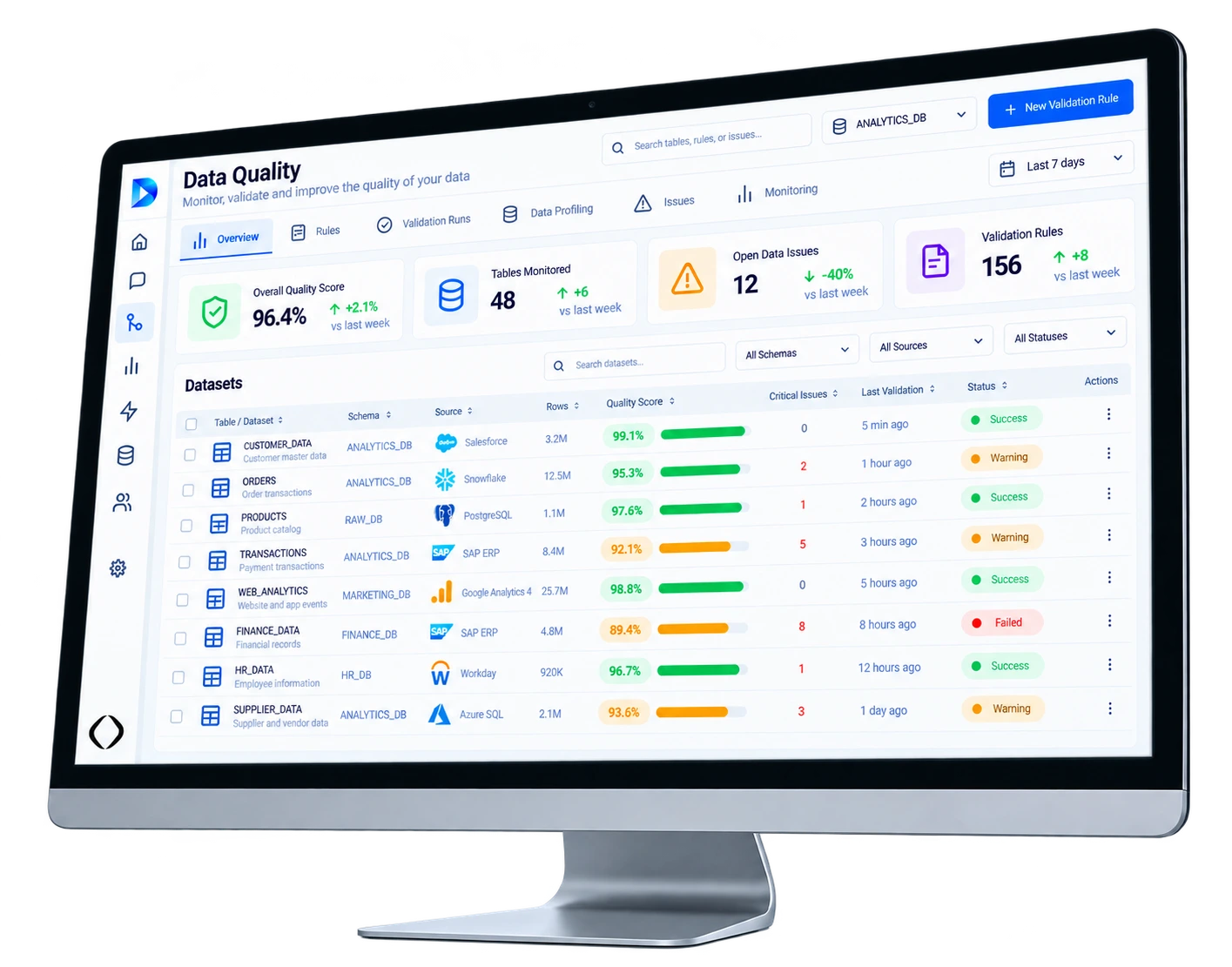
Results identify the affected layer and table, bring findings together in a KPI summary, and explain what they mean in plain language.
Illustrative example, not a real scan result.
Answers about how Dravity Data Quality checks data, explains issues and fits into your Snowflake environment.
Examples include missing values and keys, duplicates, incomplete loads, pipeline lag, unmatched foreign keys, join fan-out and inconsistent row counts or aggregates. The checks depend on the selected data layer.
No. The Data Quality Agent lets users choose scope, review checks, request adjustments and understand results through a conversation. Access still depends on their assigned permissions.
Yes. Quality scans cover sources, pipelines and multiple data layers, making it possible to find problems upstream of the Gold business tables used for reporting.
Yes. The agent can propose saved custom checks from plain-language requests, subject to plan confirmation and the ownership permissions required to change pipeline rules.
Dravity is a Snowflake Native App running in your account. Its Data Quality functionality uses your Snowflake environment and respects configured permissions and access controls.
Explore Dravity Data Quality to catch data issues earlier, explain findings clearly and keep reporting reliable, all within your Snowflake account.
An architect has your note and will follow up shortly.
Prefer to pick a time now? Book a slot with an architect